


SchoolStatus Connect
4.8676.00 Reviews
App Specs
- Version
- 1.36.3
- Updated On
- License
- Free
- Downloads
- 1,000,000+
- Developer
- SchoolStatus, LLC
- Categories
- Education
- Platform
- Android
Screenshots
 Analysis by AppCompare
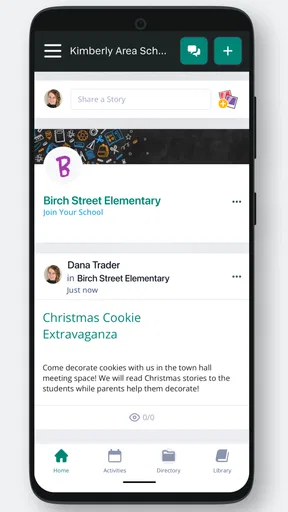
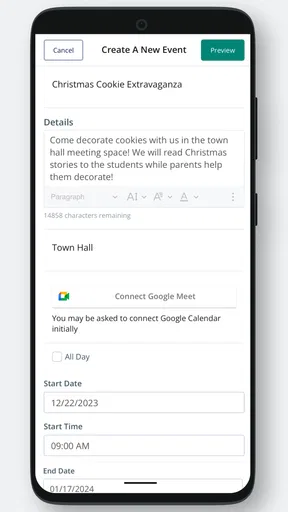
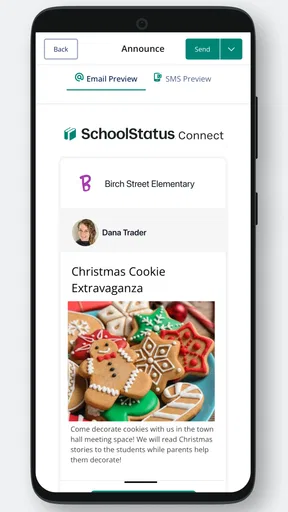
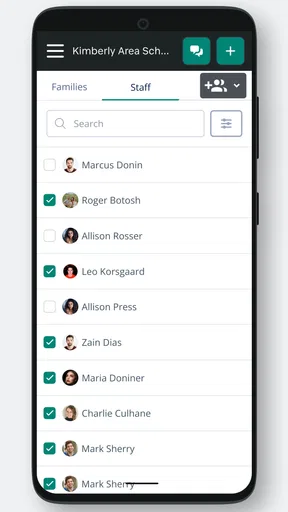
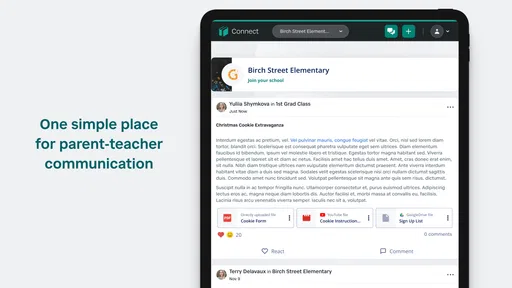
Keeping a family and a classroom in the same conversation sounds simple until messages become scattered across email, paper notes, phone calls, and separate school platforms. SchoolStatus Connect is designed to bring that communication into one place, and after spending time with it, I see its value most clearly in ordinary moments: a teacher needs to reach several families, a parent wants to check an update without searching through an inbox, or a school needs a more direct way to keep classroom communication moving.
This is an education app from SchoolStatus, LLC, aimed at family-teacher communication rather than lessons, quizzes, or student entertainment. It is free, rated for Everyone, and available for Android devices running at least version 5.0. The current version is 1.36.3. Those details make it approachable for households using older phones, although the quality of the experience still depends heavily on having a reliable connection when messages need to be sent or received.
What I like about the concept is its focus. It is not trying to replace every school tool. Its job is to make the conversation between home and school easier to follow. That narrow purpose can be a real advantage, especially for families that find broad school portals confusing. At the same time, anyone expecting a complete learning-management system will need to adjust their expectations.
How communication feels when the network is doing the work
The central experience is shaped by connectivity. When the phone has a stable mobile-data or Wi-Fi connection, the app can serve as a practical meeting point for classroom messages. A parent can check for an update during a lunch break, while a teacher can communicate with families without relying on a chain of individual calls. The benefit is less about flashy functionality and more about reducing the number of places people must remember to check.
That network dependence is worth understanding before installing it. A messaging app is only useful when new information can travel in and out. In a school setting, that matters because communication often happens at inconvenient times: during a commute, just before pickup, or while a parent is moving between work and home. If the connection is weak, the app cannot magically turn an unfinished exchange into a completed one. I treat it as a connected communication channel, not as a notebook that can be trusted to work independently of the internet.
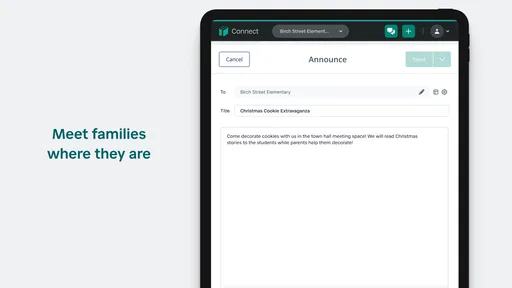
A realistic example is a last-minute classroom reminder. A teacher sends a note about what families should know before the next school day. A parent receives it while away from home, reads it, and can respond through the same communication environment rather than searching for a teacher’s address or wondering whether a paper notice made it into a backpack. That small change can prevent misunderstandings, but it assumes both sides are checking the app and have access to a working connection.
There is also a social advantage to keeping school communication in a recognizable space. Families do not have to mix classroom messages with personal conversations in a general-purpose messaging service. Teachers can keep the school relationship separate from private contact details and scattered threads. I would not describe that as a replacement for every official school process, but it can make routine contact feel more organized than relying on informal channels.
Worth Reading Before You Choose

EA SPORTS FC Mobile 26 Is a Bigger Football Game, but It Takes Time

Flipboard Shows What News Apps Must Do Beyond the Feed

Switching to Android Auto Means Rethinking Your Driving Routine

Google Calendar Makes a Crowded Week Easier to Manage

Ludo King Makes the Most of the Minutes Between Plans

Baby Panda World Brings Quick Play to Modern Phones, but Its Game Library Feels Busy
Why the mobile setting matters
SchoolStatus Connect makes the most sense on a phone because families are not always sitting at a computer when school information arrives. A mobile-first routine allows a parent to look at a message while waiting in a pickup line, between appointments, or during a short break at work. The convenience is especially useful for households where more than one adult needs to stay aware of classroom communication.
That convenience has a trade-off: phones are distracting, and an app that gathers school messages can become easy to ignore if it is treated like every other notification. I recommend creating a simple habit rather than checking constantly. For example, a parent could review school messages once in the morning and again before the evening routine. A teacher could reserve the app for information families genuinely need, instead of filling it with low-value updates. This is not a technical feature, but it has a direct effect on whether the app feels helpful or noisy.
Older devices are not automatically excluded, since the Android requirement starts at version 5.0. Still, an older operating system may offer a less comfortable experience than a newer phone, particularly if the device is already slow or short on storage. The app itself may be free, but families should remember that mobile data usage and access to a network are separate from the app’s price.
For a parent who shares caregiving responsibilities, the practical question is not just whether the app can display messages. It is whether the adults involved can establish a consistent routine around it. A household might decide that one person checks the classroom conversation after work and relays anything urgent, while another checks directly during the day. The app can support a shared communication process, but it cannot create that process on its own.
Handling weak connections and interrupted exchanges
The most important friction appears when communication is interrupted. A message may be read while the phone is moving between Wi-Fi and mobile data, or a reply may be started in a place with poor reception. In those moments, I would avoid assuming that an action has completed just because the screen appeared responsive. A sensible habit is to revisit the conversation after the connection improves and confirm that the message or reply is visible as expected.
This is particularly important for time-sensitive information. If a teacher needs to know that a child will be picked up differently, or a parent is responding to a question that affects the school day, I would not rely on a single glance at a loading screen. When the matter is urgent, a family should follow the school’s established emergency or attendance procedure as well. A classroom messaging app is useful for normal communication, but it should not be mistaken for a guaranteed emergency channel.
Recovery is easier when users keep their own expectations realistic. If a conversation does not update immediately, waiting for a stronger connection and checking again is more sensible than repeatedly tapping send. Repeated attempts can create uncertainty about whether the other person received multiple copies. I also prefer drafting a short, clear message rather than composing a long explanation in a place where reception is unreliable. The shorter message is easier to verify and less frustrating to recreate if the connection drops.
Another useful practice is to distinguish between a delayed update and a missing message. If the app is opened in a poor-signal area, the visible conversation may not represent the newest activity yet. Before acting on an old message, I would give the app a chance to refresh after returning to a dependable network. That extra pause is minor, but it prevents decisions based on incomplete information.
These are not criticisms unique to SchoolStatus Connect; they are part of using any connected messaging service. The difference is that school communication often carries practical consequences, so users notice the weakness more quickly than they would in a casual chat. The app works best when families understand that connectivity is part of the workflow, not an invisible guarantee.
Using it without wasting mobile data or attention
For data-conscious users, the best approach is deliberate rather than anxious. School messages are usually checked for a purpose, so opening the app when there is time to read and respond is more efficient than repeatedly launching it throughout the day. On a limited mobile plan, families can make Wi-Fi their preferred setting for longer conversations and use mobile data when the message is important and cannot wait.
I would also avoid turning every classroom update into an immediate interruption. A phone full of alerts can make an important school message harder to notice. If the device allows notification controls, adjusting them to match the household’s routine can help, but the exact options may vary by phone and operating system. The broader lesson is to design a checking habit that protects attention while still leaving room for timely responses.
Teachers face a similar balance. A message sent to many families has a wider effect than a private note, so clarity matters. A useful classroom workflow is to put the key action near the beginning, include only the necessary context, and avoid sending several separate updates when one well-structured message would do. That makes the conversation easier to scan on a small screen and reduces the chance that an important detail is buried in a stream of minor notices.
For families with multiple children, organization becomes more important. I would read each classroom conversation with the child and teacher in mind rather than treating the app as one undifferentiated inbox. A quick routine—checking the sender, identifying which child the message concerns, and noting any required action—can prevent mix-ups. The app may centralize communication, but the parent still needs a personal method for sorting what matters today from what can wait.
Where it fits beside email, portals, and general messaging
Compared with ordinary email, a dedicated school communication app can feel more focused. Email is flexible and familiar, but school messages can become mixed with work, shopping, newsletters, and automated notices. A classroom-centered channel gives families a clearer reason to open it. The trade-off is that it creates one more place to monitor, so it only improves communication if the school community actually uses it consistently.
Compared with a broad school portal, SchoolStatus Connect appears better suited to direct conversation than to managing every administrative task. A portal may be preferable when a family needs grades, schedules, forms, attendance information, or a larger collection of student records. I would choose the app for keeping up with classroom communication and use the school’s other official systems for functions they handle more directly.
General-purpose messaging services can feel faster because many people already use them every day. However, they may blur personal and professional boundaries, especially when teachers and families communicate through private accounts. A school-focused app offers a more appropriate setting for the relationship, even if it requires everyone to learn a separate routine. For me, that boundary is one of the strongest reasons to consider it.
The app is less compelling for a student who wants independent study tools, interactive practice, or course content. It is also not the best choice for a family whose school never communicates through it. No messaging platform can solve a participation problem: if teachers post elsewhere or parents rarely check, the app becomes another quiet icon on the phone. Before committing to it as the main channel, families should confirm that their classroom and school actually rely on it.
What the adoption figures suggest—and what they do not change
SchoolStatus Connect has a 4.8 average from around 7.5 thousand ratings, with more than 676 written reviews and over 1 million installs. That level of adoption suggests that many people find the basic communication model useful. It also gives the app a degree of familiarity that a brand-new classroom tool would not have.
Even a strong rating should not replace a personal fit check. Ratings tend to reflect whether the app works for a particular school community, device, and communication routine. A parent may enjoy the simplicity while another may find it frustrating if updates are infrequent or if the school uses several platforms at once. I read the positive reception as encouragement to try it, not as proof that it will solve every communication problem.
The free price lowers the barrier to testing it, and the Everyone content rating makes it suitable for a broad family audience. Those points matter when a school wants a common communication option that does not require a purchase. They do not remove the need for thoughtful school policies, clear expectations, or a backup process for urgent matters.
Small habits that make the experience more reliable
My first recommendation is to decide when the app will be checked before relying on it. A predictable routine is more dependable than hoping a notification will always catch attention. My second is to verify important exchanges after moving back into a strong connection. If a reply affects pickup, attendance, or a deadline, I would confirm that the conversation reflects the intended message rather than trusting an interrupted attempt.
My third tip is to keep messages easy to act on. Parents can ask one clear question at a time, while teachers can place dates, requested actions, and essential details where they are easy to find. This is especially valuable on a phone, where long paragraphs are tiring to scan. Clear writing reduces follow-up messages, which in turn reduces data use and notification clutter.
Finally, I would treat the app as part of a communication plan rather than the entire plan. Families should know where to go for urgent school matters, formal records, and information that belongs in another system. That division of labor makes SchoolStatus Connect more useful because it is not being asked to perform jobs outside its strongest area.
My connectivity verdict
SchoolStatus Connect is a sensible option for families and teachers who want a focused way to keep classroom communication together on mobile devices. I appreciate that its value comes from reducing friction rather than trying to overwhelm users with unrelated educational tools. The free access, broad age rating, and support for an older Android baseline make it approachable, while its established user base gives the service some credibility.
My recommendation comes with one clear condition: everyone involved must understand that this is a connected communication experience. Weak reception, delayed updates, inconsistent checking, or a school that uses another channel can weaken the benefit quickly. It should not be treated as an emergency system, a replacement for every school portal, or an offline record that can be trusted without checking the network.
For a parent who wants classroom messages separated from personal email and general chat, I think it is worth trying when the school supports it. For a teacher, it can provide a more direct routine for reaching families, provided messages remain purposeful and easy to follow. For students seeking learning activities, it is the wrong category of tool. In my experience, the best results come from seeing it for what it is: a practical bridge between home and classroom communication, strongest when the connection is steady and the people using it agree on how and when to communicate.
Pros
- Keeps school
- teacher
- and district messages in one place.
- Supports push notifications for time-sensitive announcements.
- Makes it easy to contact teachers without sharing personal numbers.
- Offers access to messages and updates from multiple children.
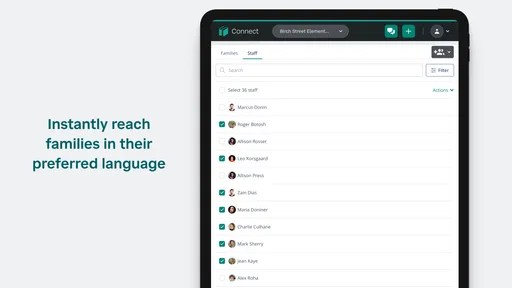
- Translation tools can help families who prefer another language.
Cons
- Notification volume may become overwhelming during busy school periods.
- Some features depend on the school or district enabling them.
- Message history can be difficult to search through after many updates.
- Requires reliable internet access for timely alerts and communication.
- Account setup may be confusing when families have multiple students.
FAQs for SchoolStatus Connect
What is SchoolStatus Connect used for?
SchoolStatus Connect is a communication platform designed to help schools, teachers, students, and families stay connected. After exploring the app, its main purpose is to centralize school announcements, direct messages, classroom updates, reminders, and other important information. It can reduce dependence on paper notices or separate messaging services, making it easier for parents and guardians to follow school-related communication in one place.
Do parents and guardians need an invitation to use SchoolStatus Connect?
In most cases, access is connected to a participating school, district, or educational organization. Parents and guardians may need to receive an invitation, use a registered email address or phone number, or follow instructions provided by the school before they can view their student’s information. If you cannot sign in or do not see the correct school or child, contacting the school office is usually the fastest way to resolve the issue.
Can I use SchoolStatus Connect to message teachers and receive school announcements?
Yes, communication is one of the app’s central features. Depending on how the school has configured the service, you may be able to receive announcements, read classroom updates, respond to messages, and contact teachers or staff through the platform. Available options can vary by district, user role, and school policy, so not every account will display exactly the same communication tools.
Does SchoolStatus Connect send notifications to my phone?
SchoolStatus Connect can provide mobile notifications for new messages, announcements, reminders, or other updates, provided notifications are enabled both in the app and in your device settings. During testing, notification behavior may depend on the school’s communication preferences and the type of message sent. If alerts are missing, check notification permissions, internet access, battery restrictions, and whether the correct account is signed in.
Is SchoolStatus Connect free, and is my personal information secure?
The app is generally intended for families and school communities without requiring parents to purchase a separate subscription, although access and features are controlled by the participating educational organization. Because the platform handles school-related and potentially personal information, users should review the school’s policies and the app’s privacy terms. Use a strong password, keep the app updated, and avoid sharing account credentials with others.


